CI HUB MCP Server: Enterprise AI Access. Governed, Secure & Compliant.
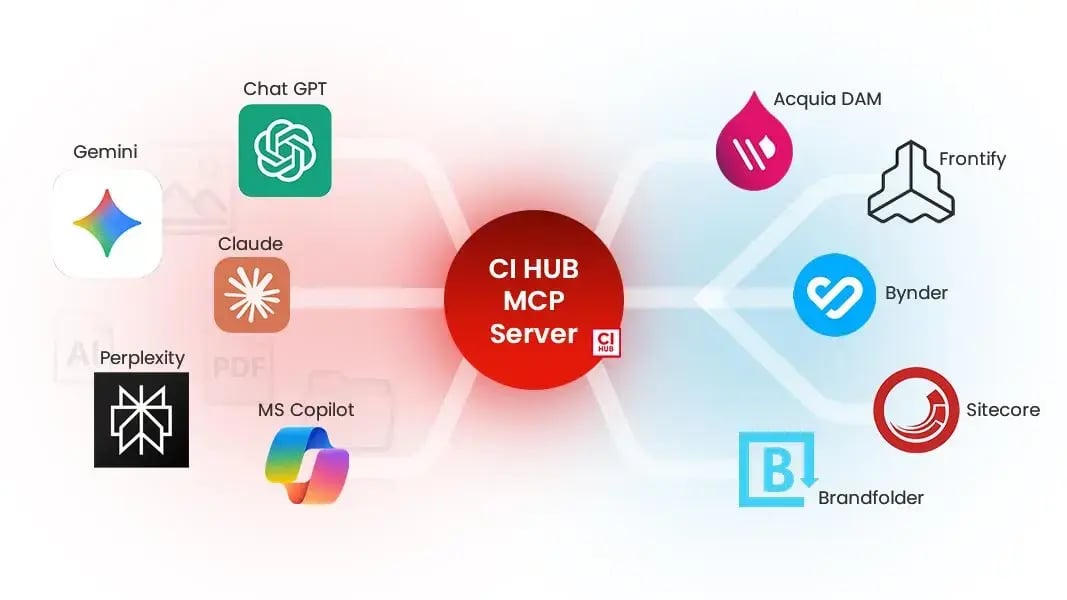
Empower your organization to connect trusted AI tools like ChatGPT, Gemini, or Claude directly to your DAM without losing control of your data.
Part of Bright, CI HUB’s new suite of AI tools, our MCP Server will turn your DAM into a secure AI access layer that IT can govern, audit, and scale across the enterprise!
The Governance Layer for AI + DAM
AI is helping teams work faster and smarter but has created a governance challenge. Employees copy and paste assets into LLMs or share potentially outdated brand materials in unapproved tools, creating compliance and security risks.
The CI HUB MCP Server eliminates “Shadow AI” by providing secure, permission-based AI access to DAM assets. Now, your AI clients get the context they need, while your IT team keeps full control!
75 %
Percentage of API gateway vendors which will support MCP features by 2026, according to Gartner.
38 %
Percentage of employees who share confidential data with AI platforms without approval, according to industry reports.
How it Works
With CI HUB MCP Server, every AI request flows through a governed access layer between your DAM and your AI chat client.
An employee can ask, “Show me all approved product shots tagged for sustainability,” and your approved AI retrieves only up-to-date assets the user is authorized to see.
Actions like summarizing, renaming, or moving assets all occur within your company’s compliance framework. Every request is logged and auditable in the DAM, and if a user loses DAM access, the AI does too.

Transform your DAM into an AI-powered brain
AI that knows your brand
Your AI chats directly with your DAM, finding approved & up-to-date assets.
Securely Governed
Every action follows your organization’s DAM permission rules, so the AI only accesses what it should.
Wide Compatibility
Works seamlessly with ChatGPT, Gemini, Claude, or any MCP-compatible client.
Contextual Knowledge
AI that understands your brand language, context and 'why' for better results.
Instant Access
No more switching tabs or searching in drives. Your assets appear in seconds, right in your chat.
Scalable
From a single brand team to global enterprise rollout. Deploy anywhere, anytime.

Do you have questions?
We have the answers
The MCP Server enables seamless interaction between DAM systems and connected AI tools directly though chat, offering a set of actions to the user.
Core system actions include handling provider selection, brand configuration, and file-to-text conversion for AI processing.
Asset management actions enable users to search, upload (via URL), delete, rename, move, download, and manage asset versions with simple prompts.
Folder management actions allow users to browse, create, delete, rename, and move folders within the DAM structure.
Batch operations significantly improve use efficiency by allowing multiple actions. These include creating folders, renaming assets, or deleting files in a single request, reducing the number of steps required (with up to 10 actions per batch).
For more information visit: https://support.ci-hub.com/ci-hub-bright-mcp-server-capabilities-and-actions
Users can add several DAMs at the same time to the MCP Server. They will need to authenticate in each one individually once, and then each system’s permissions are respected at all times from then on.
Users can ask their AI to access individual DAMs only (even if it has access to several), or access several of them in succession. Users can also switch which systems they want to have authenticated when they disconnect and reconnect to the MCP Server.
When assets have multiple versions, expiry dates or rights restrictions, this can be handled by Bright AI.
If a DAM system supports asset versions, Bright will give the latest asset version to AI by default and tell it the version number in the metadata. AI can request other versions of an asset with the Asset-Versions tool call.
See https://support.ci-hub.com/ci-hub-bright-mcp-server-capabilities-and-actions for the full tool call capabilities of the Bright MCP Server, assuming the DAM system supports them on their side.
For the MCP Server, an unnoticeable amount of latency is added to the API response of the DAM system.
If the DAM system API is fast, responses will ba fast. However, the slowest part of the chain will be the AI/LLM making sense of the response and providing the answer the user needs. The calls themselves will not make a noticeable impact for the user.
For non-MCP-Server Connectors (Connector Professional, Canva Connector and Brand Connector) CI HUB adds no latency. A direct tunnel is created between the users’ machines and the DAM system, and the user gets the API performance of their DAM system.